
排序

从零开始:RK3588 平台上 OpenCV 4.12.0 编译全流程详解
OpenCV介绍 OpenCV(Open Source Computer Vision Library) 是全球规模最大的计算机视觉库,自 2000 年 6 月起正式推出并持续迭代。作为开源项目,它由非营利性组织 开源视觉基金会(Open Sour...
 12个月前
12个月前
常见地理坐标系概览与对比
一、按表示方式分类1. 大地坐标系(Geodetic Coordinate System)采用经度、纬度、高程表示位置基于椭球体模型示例:116.391°E, 39.907°N2. 地心坐标系(Earth-Centered, Earth-Fixed, ECEF)...
1年前
解决FFmpeg6.1.1编译后缺少ffplay的问题
解决FFmpeg6.1.1编译后缺少ffplay,只有ffmpeg和ffprobe没找到ffmpeg原因:缺少SDL的库sudo apt-get install libsdl1.2-dev sudo apt-get install libsdl2-dev原文链接:https://blog.csdn.net/...
2年前
Ubuntu 22.04编译Linux内核提示错误multiple definition of `yylloc’
摘抄修改自:作者:Leung_ManWah链接:https://www.jianshu.com/p/8205095e50cd报错信息在使用Ubuntu22.04系统时,编译Linux内核出现错误scripts/dtc/dtc-parser.tab.o:(.bss+0x10): multiple d...
2年前
海思3559C交叉编译OpenSSH:实现高效安全的SCP、SFTP文件传输
为什么想要使用SSH? 海思3559C默认支持telnet、FTP以及NFS等多种方式来实现板端调试,其中Telnet虽然方便,但安全度欠佳,且不支持文件传输。为了更好地学习和掌握3559C,我们进一步寻求挑战,...
3年前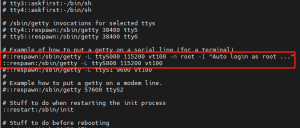
Hi3559C关闭开机串口自动登录root用户,强制输入账户密码登录 【转】嵌入式通过串口连接如何屏蔽自动登录
本来想写一篇关于这个的文章的,看了其他博主总结的不错,转载收藏。 思路就是修改 /etc/inittab文件里面的登录脚本,去掉-n root 以及后面的登录提示。 以下是引用内容: 原文链接:嵌入式通过...
3年前
Linux Shell脚本入门学习--正点原子【第一期】手把手教你学Linux之Ubuntu入门篇 P19 P20
本文是一篇关于Linux Shell脚本入门学习的文章,好久没用了有些遗忘,本次主要想巩固基础,为后续开发做准备。 0 什么是Shell Shell 是一个用 C 语言编写的程序,它是用户使用 Linux 的桥梁。Sh...
3年前Ubuntu设置开机自动启动脚本/程序的各种方法
一、Ubuntu添加开机自动启动程序的方法 开机启动时自动运行程序 Linux加载后, 它将初始化硬件和设备驱动, 然后运行第一个进程init。init根据配置文件继续引导过程,启动其它进程。通常情况下,...
3年前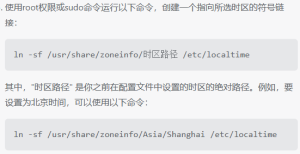
关于海思3559C修改默认时区的探索 UTC改为上海时区(正八区)嵌入式Linux设置时区
1 背景 在使用3559C开发板过程中发现我自己编译的官方SDK固件同步NTP服务器的时间要比公司的固件晚8个小时,公司的固件显示时间是北京时间。相差八个小时,这个时间比较巧,首先想到的就是时区...
3年前
海思3559C实现OSD字符叠加的探索(二)最新版本SDL和SDL_ttf的从编译到使用支持透明背景,彩色字体
海思3559C实现OSD字符叠加的探索(一)详细介绍了编译的过程,本文适合快速上手,快速编译,如无特别说明,代码版本与上文保持一致。 经过上文的探索,发现可以不主动去编译FreeType这里就省略...
3年前